Installing the Game Without Losing Money Before You Start
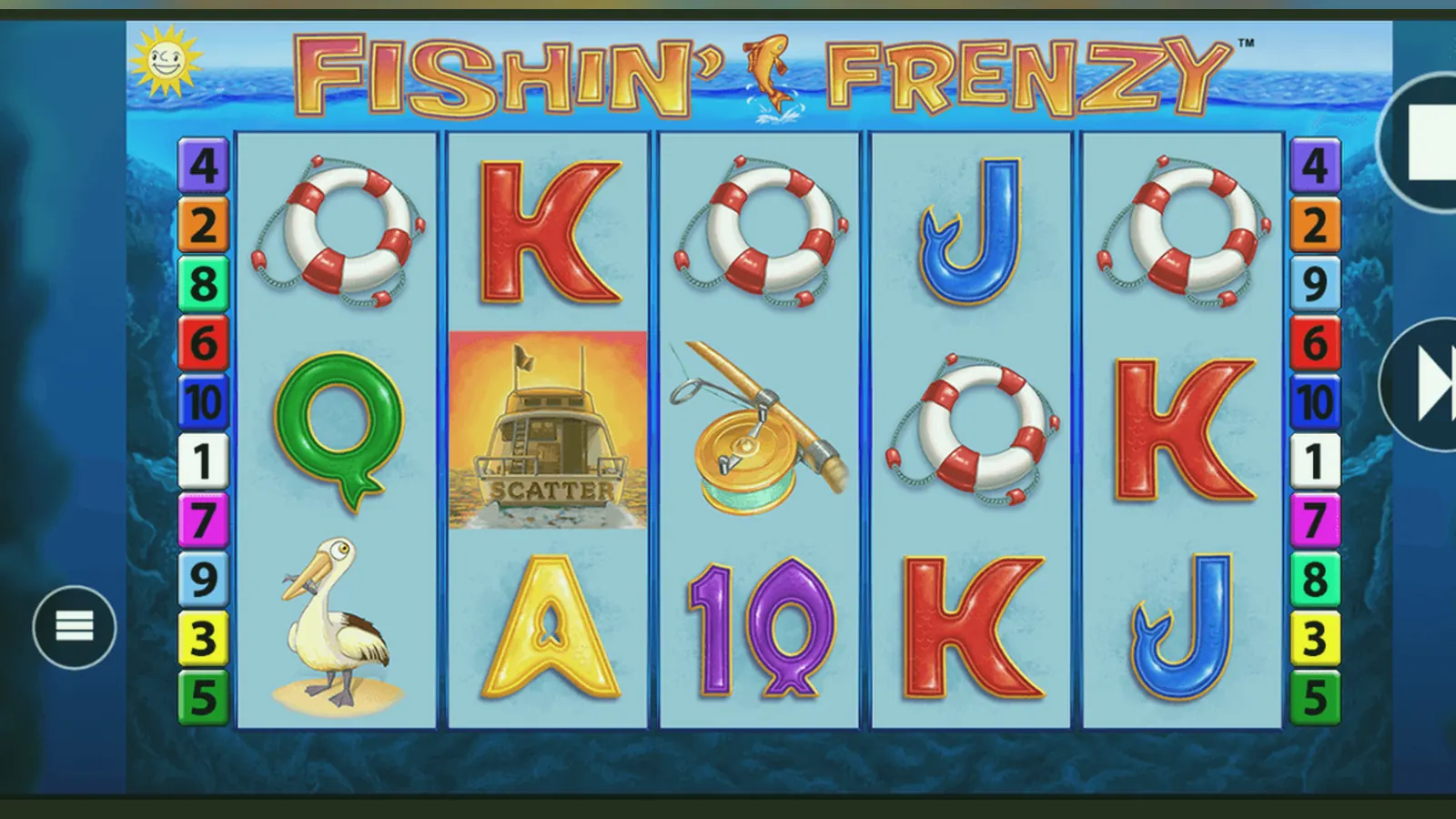
Here's what usually goes wrong: you search for Fishin Frenzy, land on a page that looks like the Play Store, tap Install, and three steps later you've either handed over an email to a marketing list or downloaded an APK that phones home to a server in Curaçao. The real game doesn't live in a standalone app—it's HTML5, runs in the browser, and sits behind a UKGC-licensed operator. Everything else is a wrapper, a shortcut, or a fake.
This page walks through every install path, marks the ones that cost you nothing and the ones that drain your bankroll before you've placed a spin. We'll show you the store-style card the legitimate operators use, the numbered steps for each route, the permissions that should set off alarms, and the three questions that separate a licensed site from a clone skimming your deposit.
The Card: What a Legitimate Listing Actually Says
If you're looking at a page styled like the Play Store or App Store, check these fields against what you see. A mismatch—version number stuck at 1.0.0 for two years, developer name that's three random words, or a download count in the billions—means you've found a scraper site or a clone.
The operator's name appears in the footer, not the developer field. Blueprint Gaming makes the game; the operator holds the UKGC remote licence and processes your deposits. If the listing names a developer you can't find in the UKGC register, stop.
Five Screens You'll Actually See
The game itself is three screens: the 5×3 grid with fish symbols, a free-spins overlay when you land three scatter fishermen, and a paytable that shows the catch values. Before you reach them, you'll pass through two gates the UKGC mandates.
- Age verification landing: date of birth, postcode, sometimes the last four digits of your bank account. This check runs against Experian or a similar bureau. If it fails, you'll need to upload a passport or driving licence before you can deposit. Budget 24–48 hours.
- Deposit-limit prompt: the operator must ask you to set a daily, weekly, or monthly cap before your first transaction. The prompt reappears if you try to raise the limit; the increase takes 24 hours to apply, the decrease is instant.
- The lobby: a scrollable grid of game tiles. Fishin Frenzy usually sits in the Slots or Top Games category. Tap the tile, and the game loads in full-screen.
- The reel screen: 5×3 grid, stake selector at the bottom (£0.10 to £5.00, or £2.00 if you're 18–24), spin button, balance top-right. Autoplay and turbo-spin toggles live in a hamburger menu.
- Free-spins overlay: when you trigger the feature, the screen dims and a panel counts down your 10 spins. The fisherman collects every fish symbol that lands; values add to a running total. The overlay clears when the feature ends, and you're back to the base reel.
That's it. If the app shows a separate screen for daily login bonuses, a level-up system, or in-game currency that isn't your actual GBP balance, you're not playing the UKGC-licensed version—you're in a social-casino wrapper that lets you buy coins and play for fun, with an upsell to a real-money site buried three taps deep.
Four Install Paths, Ranked by Risk to Your Bankroll
Every route below ends with the same HTML5 game, but the steps in between vary in how much friction they add and how many times you'll be asked to verify your age or upload a document.
- Browser (lowest risk): Open Safari, Chrome, or Firefox on your phone, navigate to a UKGC-licensed operator (check the register and match the licence number in the footer), register, verify your age, set a deposit limit, fund your account, search for Fishin Frenzy in the lobby, tap the tile. The game runs in the mobile browser. No install, no storage used, no permissions requested. If the site asks you to enable notifications, you can decline; the game still works. Withdrawals go to the same payment method you used to deposit. E-wallets clear in a few hours, Faster Payments to your bank take same day to two working days, debit-card refunds take one to three days. The first withdrawal is always the slowest because the operator will request ID and proof of address if the automated check didn't pass.
- Add to Home Screen (low risk, slight convenience): Same steps as above, but after the game loads in the browser, tap the Share icon (iOS) or the three-dot menu (Android) and choose Add to Home Screen. You'll see an icon on your home screen that opens the game in a browser frame without the address bar. It's still the web version; you're just skipping the step of typing the URL. Storage cost: negligible, a few kilobytes for the icon. Risk: none, as long as the URL behind the icon points to the licensed operator's domain.
- Operator-branded app from Play Store or App Store (medium risk, more friction): Some UKGC-licensed operators publish a white-label casino app that wraps their entire lobby, including Fishin Frenzy. Search the Play Store or App Store for the operator's name, check the publisher matches the name in the UKGC register, install. The app will request notification permissions (you can decline) and, on first launch, redirect you to the age-verification flow and deposit-limit prompt. Once you're verified and funded, the game sits in the lobby. The advantage: one tap to open the app, no URL to remember. The cost: 80–120 MB of storage, a separate login (or biometric unlock if you enable it), and a longer KYC queue if the operator's automated check flags your account, because app users often expect instant play and flood support when they're asked for documents. Withdrawals work the same as the browser route.
- APK from a third-party site (high risk, likely a clone or a phishing front): If you search for Fishin Frenzy APK, you'll find download links on sites that mimic the Play Store layout but aren't Google. These APKs fall into three categories: repackaged social-casino apps that use in-game coins and upsell you to a real-money site after you've spent 20 minutes playing for fake currency; phishing wrappers that ask for your email, phone number, and card details before the game loads (the details go to a marketing list or a fraud ring, the game either doesn't load or redirects to a Curaçao-licensed site that isn't in the UKGC register); or genuine operator apps sideloaded from a mirror, which is pointless because the operator already publishes the same app in the Play Store if they want mobile users. Installing an APK from an unknown source requires you to enable Install Unknown Apps in your phone's settings, which disables a security layer. If the APK requests permissions for contacts, SMS, or phone calls, it's a red flag; the legitimate game needs storage (to cache assets) and network access (to connect to the operator's server), nothing more. We don't recommend this route. If the operator isn't in the Play Store, it's either because they don't want the compliance overhead or because Google rejected them, and neither reason works in your favour.
What Your Phone Needs (and What It Doesn't)
Fishin Frenzy is HTML5. The reel logic runs server-side; your phone renders frames and sends tap events. That means the hardware bar is low, but the network and software stack matter more.
- OS: iOS 13 or later, Android 8 (Oreo) or later. Older versions might load the game, but the operator's site will block you at registration if your browser doesn't support TLS 1.2.
- Browser: Safari 13+, Chrome 80+, Firefox 78+. If you're using Samsung Internet or Opera, test the game in demo mode first; some operators block less common user agents to reduce fraud vectors.
- RAM: 2 GB minimum. The game itself uses ~150 MB when active, but if you're also running Spotify, WhatsApp, and three browser tabs, iOS and Android will kill background processes to free memory, and the game will reload mid-session, which resets your autoplay queue.
- Storage: none if you play in the browser, 80–120 MB if you install the operator's app.
- Network: 3 Mbps down, 1 Mbps up. The game streams frames on demand; a weak 4G signal will cause stutter between spins. Wi-Fi is smoother. If you're on a train and the connection drops mid-spin, the game will reconnect and show the result when the link comes back; the RNG already ran server-side, so you won't lose the bet.
- Screen: any resolution works, but the game is designed for portrait on phones (9:16 or similar) and landscape on tablets. If you force landscape on a phone with a narrow screen, the stake controls will overlap the reel.
Battery drain is moderate. Expect 15–20% per hour of active play, more if you enable turbo spins and the screen brightness is above 70%. The game doesn't run in the background; close the tab or app, and the session pauses.
Version Notes: What Changed and What It Means for Your Session
Blueprint Gaming pushes updates to the operator's server; you don't download patches. The version number in the store-style card tracks the operator's app wrapper, not the game RNG. Here's what the recent updates actually changed.
- 3.1.8 (January 2026): UKGC affordability-check integration. If your net deposits cross £150 in a rolling 30-day window, the game will lock and redirect you to a verification flow that pulls credit-reference data. The threshold applies across every UKGC-licensed site you use, not just one operator. The game unlocks after you complete the check, which takes a few minutes if the data matches and 24–48 hours if you need to upload bank statements.
- 3.1.6 (November 2025): Stake-cap enforcement by age. If you registered as 18–24, the maximum bet dropped from £5.00 to £2.00. The slider won't let you exceed the cap; if you try to edit the stake in the browser console, the server rejects the bet.
- 3.1.4 (September 2025): Session-time display. A clock in the top corner shows how long you've been playing. It resets when you close the tab or app, so it tracks active sessions, not cumulative time.
- 3.1.0 (June 2025): Faster Payments for withdrawals. E-wallets already cleared same-day; now bank transfers using the Faster Payments rail arrive within two working days instead of three to five. The first withdrawal still waits for KYC approval, so don't expect same-day cash-out until you've passed document review.
Spotting Clones and the Permissions That Give Them Away
A fake Fishin Frenzy app or site will try to look close enough to pass a three-second glance. Here's how to catch it before you've entered your card details.
- Developer name: Blueprint Gaming doesn't publish apps. The operator does. If the developer field says Blueprint Gaming, it's a clone. Check the UKGC register for the operator's name and match it to the listing.
- Licence number in the footer: every UKGC-licensed site shows the licence number at the bottom of the page, and it's a hyperlink to the register entry. If the footer says Curaçao eGaming or Malta Gaming Authority, you're not on a UK-legal site. If there's no footer, or the licence number is an image instead of a link, stop.
- Permissions: a legitimate casino app requests storage (to cache game assets) and network access (to connect to the server). If the install prompt asks for contacts, SMS, phone calls, camera, or microphone, decline and delete the app. The game doesn't need any of those. Camera access is only requested during KYC if you choose to upload a document via the in-app scanner, and that's a one-time prompt inside the verification flow, not at install.
- GAMSTOP integration: if the registration form doesn't mention GAMSTOP or ask if you're self-excluded, it's not a UKGC-licensed site. The operator is required to check your details against the GAMSTOP register before letting you deposit.
- Deposit methods: UKGC sites accept debit cards, PayPal, Apple Pay, Open Banking, and paysafecard. They do not accept credit cards (banned for gambling since 2020), cryptocurrency, or wire transfer. If the payment page offers Bitcoin or Western Union, you're on an unlicensed site.
- Language and currency: the game and site should default to English and GBP. If the lobby shows USD, EUR, or INR without letting you switch, or if the terms and conditions are machine-translated from another language, the operator isn't targeting UK players.
The safest route is to pick an operator from the UKGC register, verify the licence number in the footer, and install their app from the official Play Store or App Store listing. If you skip the register check, you're trusting the app's metadata, and cloners copy that.
| Check | Legitimate | Clone or Unlicensed |
|---|---|---|
| Developer name | Operator (in UKGC register) | Blueprint Gaming or random words |
| Footer licence | UKGC number (hyperlinked) | Curaçao, Malta, or missing |
| Install permissions | Storage + network | Contacts, SMS, camera at install |
| Deposit methods | Debit card, PayPal, Open Banking | Credit card, crypto, wire |
| Currency | £ (GBP) | $, €, ₹ without switch option |
FAQ
Do I need to download anything to play Fishin Frenzy on my phone?
No. The game runs in your mobile browser (Safari, Chrome, Firefox). You register with a UKGC-licensed operator, verify your age, set a deposit limit, fund your account, and tap the game tile in the lobby. If you want a home-screen shortcut, use Add to Home Screen after the game loads; it's still the browser version, just without the address bar. Some operators publish a casino app in the Play Store or App Store, which is a wrapper around their lobby. The game inside is identical to the browser version. Storage cost for the app is 80–120 MB. The browser route uses no storage.
What happens if I install an APK from a site that isn't the Play Store?
You'll either get a social-casino clone that uses fake coins and upsells you to a real-money site, or a phishing wrapper that harvests your email and card details and redirects to an unlicensed operator. Sideloading an APK requires you to enable Install Unknown Apps, which disables a security layer on your phone. If the APK requests permissions for contacts, SMS, or phone calls, it's a red flag; the real game only needs storage and network access. We don't recommend this route. If the operator isn't in the Play Store, check why: either they don't meet Google's compliance bar, or they don't want the overhead, and neither works in your favour.
Why does the first withdrawal take longer than the deposit?
UKGC operators must verify your identity and address before processing a withdrawal, even if the automated age check passed at registration. The first time you request a cash-out, you'll be asked to upload a photo of your passport or driving licence and a recent utility bill or bank statement. The operator's compliance team reviews the documents, which takes 24–48 hours. After you're verified, withdrawals clear faster: e-wallets in a few hours, Faster Payments to your bank in same day to two working days, debit-card refunds in one to three days. Subsequent withdrawals don't need documents unless you change your payment method or the operator's fraud system flags the account for a spot check.